
 מולטימדיה
 Windows
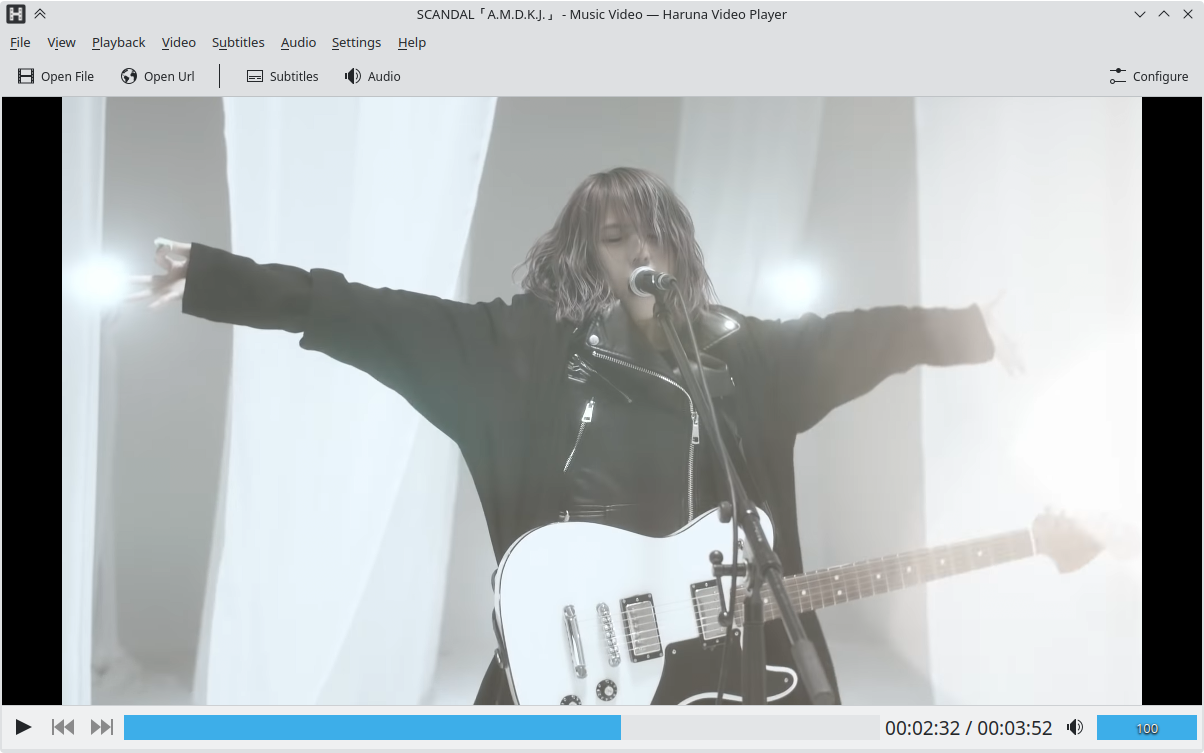 החלון הראשי של Haruna
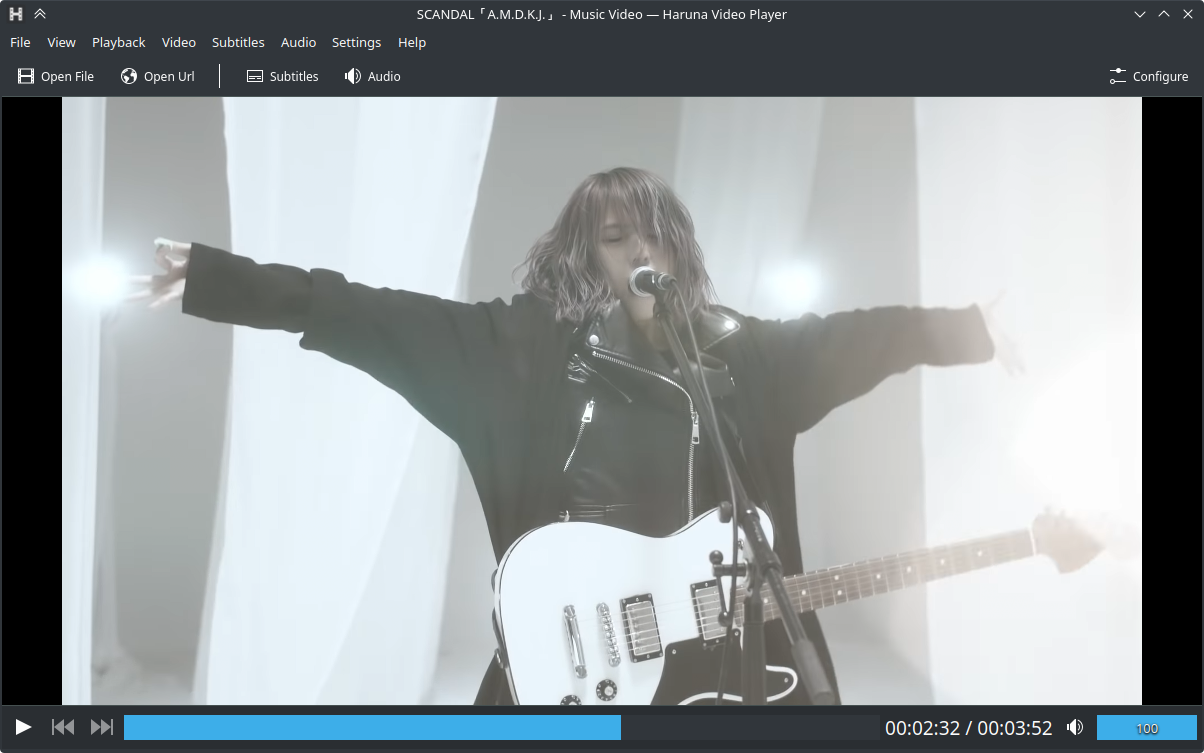 החלון הראשי של Haruna, ערכת צבע כהה של בריזה
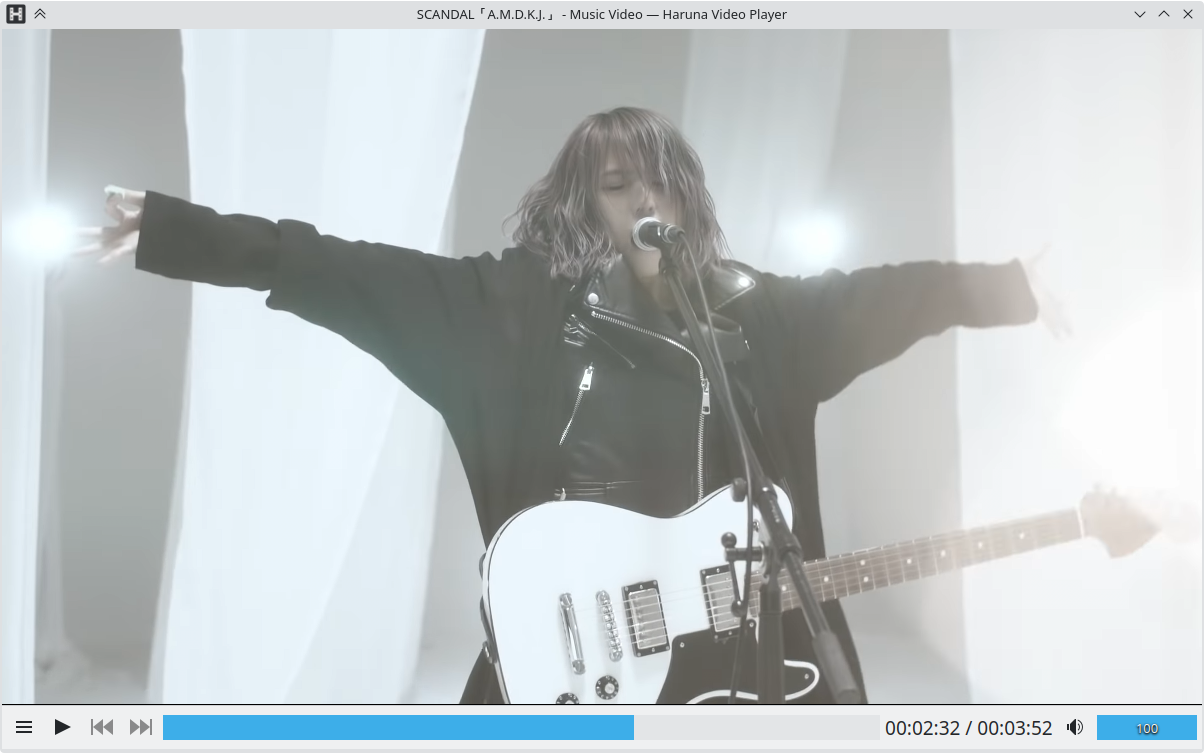 Haruna בלי סרגלי תפריטים וכלים
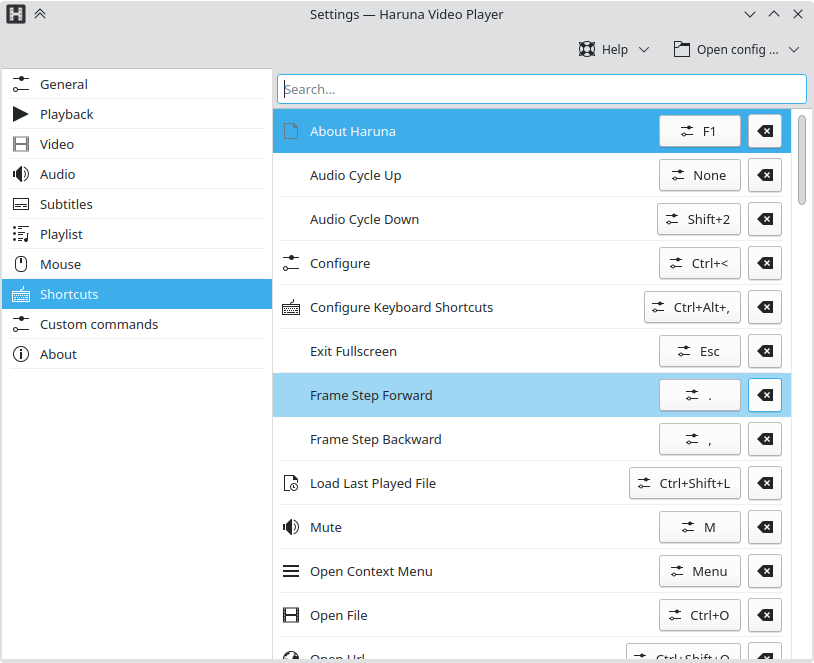 חלון ההגדרות של Haruna
נגן מדיה בקוד פתוח עם מגוון רחב של אפשרויות כדי שיפעל כמו שמתאים לך.
יכולות
- ניגון סרטונים מקוונים, באמצעות youtube-dl
- תמיכה ברשימות נגינה של YouTube
- החלפת מצב רשימות נגינה עם מעבר העכבר מעליהן, רשימת הנגינה חופפת לסרטון
- דילוג על פרקים שמכילים מילים מסוימות
- אפשר להגדיר קיצורי דרך וכפתורי עכבר
- דילוג מהיר לפרק הבא בלחיצה אמצעית על פס ההתקדמות



מהדורות RSS
1.8.1 2026-05-19
יכולות
- פתיחת מספר קבצים דרך שורת הפקודות, מאפשר לפתוח רק את הקבצים הנבחרים במנהל הקבצים
- פעולת עצירה, זמינה בתפריט הנגינה
- הגדרה להפעלת התקדמות בשורת המשימות
- הצגת שם קובץ/כותרת בחלונית הצפה בעת פתיחת קובץ
- mpris: איתור והגדרת עטיפה מקובץ תמונה חיצוני לקובצי שמע בלי עטיפה פנימית
- הנפשת טעינה בהתאמה אישית
- הגדרה למאפיין sub-border-style של mpv
- רשימת נגינה: פריט תפריט לפתיחת קובץ ביישום MediaInfo (אם מותקן)
- רשימת נגינה: אפשר לסדר בסדר עולה/יורד לאפשרות „ללא”
- רשימת נגינה: חיווי להמשך הנגינה מאותו המקום תחת משך הזמן
- רשימת נגינה: ידית גרירת פריטים מופיעה בעת ריחוף מעל
תיקוני תקלות
- כפתור תפריט הפרקים מוסתר כשאין פרקים
- כפתור איפוס משפחת הגופנים לא שמר את ההגדרה
- רשימת נגינה: שחזור רשימת הנגינה הפעילה החרונה רק אם היישום נפתח בלי קובץ
- רשימת נגינה: גלילה איטית כדי לנגן את הפריט על ההתחלה
- רשימת נגינה: לחיצות מזניקות את פריט רשימת הנגינה שתחת הלשונית
- רשימת נגינה: אין תפריט בלשוניות
1.7.1 2026-01-14
תיקוני תקלות
- חיפוש ברשימות נגינה תוקן
- תוקנה בעיה שצבע הרקע של חלונית צצה זהה לצבע הטקסט שלה
1.7.0 2025-12-21
יכולות
רשימת נגינה
- נוספו מיון וקיבוץ מתקדמים
- נוסף תפריט הקשר לפתיחת קובץ ב־Hana (יצרנית תמונות ממוזערות, רק אם מותקנת)
- רשימת הנגינה הפעילה אחרונה תוגדר לגלויה בעת הפעלת היישום
אחר
- נוספו הגדרות איזון שמע
- תמונות ממוזערות של mpris מוגדרות רק לקובצי שמע, כך מתאפשר לשורת המשימות של מערכת ההפעלה להציג את החלון החי בפועל בתצוגה מקדימה
- גודל סמל הנגינה ברשימת הנגינה המצומצמת מעתה קטן יותר
תיקוני תקלות
- תוקנה בעיה שתיקיית מסד הנתונים לא נוצרה
- תוקנה בעיה שחלונית העצה בסרגל החתימה לא התעדכן כשהקובץ משתנה והעכבר לא זז
- תוקנה מחיקת פקודות בהתאמה אישית
- שמירת הכתובת האחרונה שנפתחה תוקנה
1.6.0 2025-10-24
יכולות
- נוספה אפשרות לשינוי גו
- הפעולה להוספת רשימת נגינה/לשונית חדשה עברה לסרגל הלשוניות
- הפעולה לפתיחת רשימת נגינה עברה לתפריט „הוספה”
- נוסף סמל לפעולת נגינה בכותרת רשימת הנגינה
- הגדרות עכבר: פעולה שהוקצתה לאירוע עכבר ניתן לשנות מעתה
תיקוני תקלות
- תוקנה בעיית נגינה בלולאה של רשימות נגינה עם קבצים בודדים
- תוקנה בעיה שלשוניות רשימת הנגינה לא נשמרות
- תוקן שינוי שם של רשימות נגינה מיד לאחר הוספתן
- תוקן מצב שבו כפתורי הבא/הקודם הושבתו בזמן הוספת פריטים על ידי גרירה באזור הגרירה „הוספה לרשימת נגינה”
- תוקנה בעיה שפעולת נגינת הפריט הקודם לא גלשה בחזרה מהפריט הראשון ברשימת הנגינה לפריט האחרון
- תוקנה בעיה שלא ניתן להוסיף לשונית חדשה ברשימת הנגינה כש־yt-dlp לא מותקן
- נוסף תיקון עוקף לכך שחלוניות קבצים לא קיבלו אירועי מקשים; מקשי escape והחיצים לא עבדו
1.5.0 2025-09-30
יכולות
הגדרות
- כללי: נוספה הגדרת מופע יחיד לנגינת קבצים חדשים בעת הוספה לרשימת הנגינה
- כללי: הסרנו את
- רשימת נגינה: נוספו אפשרויות לשלוט בהתנהגות הנגינה
- עכבר: שוכתב כדי לאפשר מקשי החלפה
- עכבר: נוספה תמיכה בכפתורי העכבר לקדימה ואחורה
- כתוביות: אם שם תיקיית יחסית ברשימת
- לחלון ההגדרות יש רוחב וגובה מזעריים
רשימת נגינה
- נוספה תמיכה בריבוי רשימות נגינה
- אפשר לסדר פריטים מחדש ידנית בגרירה
- אפשר לבחור פריטים, ctrl+לחיצה כדי לבחור כמה פריטים, shift+לחיצה כדי לבחור טווח.
- אפשר לנפות פריטים
- נוספו הגדרות לשליטה בהתנהגות הנגינה כשקובץ מסתיים
- בעת שמירת רשימת נגינה סיומת הקובץ מוגדרת ל־m3u
- אפשר להוסיף קבצים ותיקיות בגרירה
- אפשר להוסיף מגוון קבצים דרך האפשרות בכותרת
- רשימת הנגינה מוסתרת כשהעכבר יוצא מהחלון כשהחלון מוגדל, מונע את פתיחת רשימת הנגינה כשהעכבר עובר לצג אחר
נגינה
- אם אי אפשר לנגן קובץ מופיעה שגיאה והנגינה נפסקת במקום לנסות לנגן את הקובץ הבא (מונע לולאה אינסופית כשאי אפשר לנגן אף קובץ ברשימת הנגינה)
- יכול לנגן קבצים שמתחילים בנקודה (קבצים מוסתרים)
- מופיעה שגיאה כשהשגת רשימת נגינה של youtube נכשלת
אחר
- mpris: נוספה תמיכה ב־Shuffle (ערבול) וב־LoopStatus (מצב לולאה)
- חלונית בחירת הפעולה הוחלפה והיא משתמשת מעתה ב־Kirigami.SearchDialog
- הסמל המסתובב הוחלף בסרגל התקדמות ותווית
- אזור הגרירה של הסרטון מפוצל לשני חלקים מעתה
- החלק העליון תמיד מתווסף לרשימת הנגינה כברירת המחדל
- החלק התחתון מפנה את רשימת ברירת המחדל ומוסיף את הקבצים והתיקיות שנגגרים, כאשר רק קובץ אחד נגרר הוא מתנהג כמו פעולת פתיחת קובץ (מפנה את רשימת הנגינה וטוענת קבצים אחראיים אם כך הופעל בהגדרות)
- קבצים אחרונים מאוחסנים מעתה במסד נתוני sqlite
- מקומות הזמן שמשמשים לשחזור סרטונים מאוחסנים גם הם במסד הנתונים
- שינה חסומה גם ב־Windows
- מעתה ניתן לתרגם את כל המחרוזות לכאורה
תיקוני תקלות:
- תוקנה פעולת הלולאה, החיווי על המסך לא הופיע ופס ההתקדמות לא הדגיש את טווח הלולאה
- בטרם טעינה לבדוק שהקובץ קיים
- תוקנה טעינת כתוביות שגויות בעת שימוש בכתוביות נסוגות/ברירת מחדל
- תוקנה בעיה שסרגל ההתקדמות נהיה גבוה יותר כאשר תפריט הפרקים מתגלה
- תוקנה תקלה שנגינת הסרטון נעצרה לאחר לחיצה על סרגל ההתקדמות/חתירה
1.4.0 2025-04-15
יכולות
- נוספה הגדרה לחיפוש כתוביות באופן נסוג. מחפש בתיקיות שקשורות לתיקיית ההורה של הקובץ והתיקייה המתנגנים כפי שהוגדר על ידי ההגדרה `טעינת כתוביות מתוך`
- נוספה תמיכה בפתיחת רשימות נגינה ב־YouTube מכתובות שמכילות מזהה רשימת נגינה
- נוספו פעולות לסובב את הסרטון עם כיוון השעון (ctrl + r) ונגד כיוון השעון (ctrl + e)
תיקוני תקלות
- תוקנה בעיה שתפריט הרצועות מציג רצועות מקבצים שנפתחו בעבר
- תוקנה בעיה שכתוביות שנוספו בגרירה לא נוספו לתפריט הכתוביות
- בזמן שמחוון ההתקדמות/חתירה נלחץ הסרטון נעצר, מתקן פתיחה מחזורית של הסרטון הבא כאשר הוא נגרר ומוחזק כל הדרך עד הסוף
1.3.3 2025-02-24
תיקוני תקלות:
- תוקנה בעיה שהמיקוד לא עובר ליישום בעת פתיחת קובץ כאשר עותק יחיד פעיל והנגן פתוח
- תוקנה חפיפה בין כותרת החלון לפרטי משך הנגינה בכותרת התחתונה
- מומשה דחיית שומר מסך ב־Windows
1.3.2 2025-01-22
תיקוני תקלות:
- תוקנה בעיה שמקשי קיצור לא עבדו כששפת המערכת אינה אנגלית
- תוקן שחזור נקודת הנגינה
1.3.1 2025-01-21
תיקוני תקלות:
- תוקנה בעיה שמניעת החשכת המסך לא עבדה
- תוקנה הגדרת עוצמת שמע דרך mpris2
1.3.0 2025-01-15
הרבה קוד שוכתב, חשוב לדווח על כל תקלה שנקרית בדרכך. יש רשומת „דיווח על תקלה” בתפריט ה„עזרה” או בהגדרות תחת עמוד על אודות.
יכולות:
- השתנו ההגדרות שקשורות בשחזור מקום הנגינה, אם שינית את ברירות המחדל יכול להיות שצריך להגדיר אותן מחדש
- רשימת נגינה: נוספו רשומות לתפריט ההקשר לפתוח בדפדפן ולהסיר כתובות לא מקומיות (מרשימת הנגינה)
- נוספה הגדרה (תחת כללי) לעליית היישום במסך מלא
- נוספה הגדרה (תחת כתוביות) לשלוט בבחירת הכתוביות אוטומטית
- פעולות ברירת המחדל של הלחצנים השמאלי והימני בעכבר הוחלפו: לחיצה שמאלית היא מעתה נגינה/השהיה ולחיצה ימנית פותחת את תפריט ההקשר. אפשר לשנות את הפעולות בעמוד הגדרות העכבר
- גרירת סרגל החתירה/התקדמות תעדכן את התצוגה הראשית וגם את התצוגה המקדימה של סרגל החתירה
- גודל החלון המזערי הוקטן
- תיבת הסימון לפיענוח חומרה הוחלפה באפשרות בתיבת הבחירה הנגללת של פיענוח חומרה
תיקוני תקלות:
- ביצועי הגלילה ברשימות נגינה, תפריט מקשי הקיצור והפרקים בסרגל החתירה השתפרו
- תוקנה בעיה עם הגדרת מקשי קיצור עם מקשי החלפה (Ctrl, Alt וכו׳)
- תוקנה בעיה שרצועות השמע והכתוביות הפעילות לא נבדקות כראוי
- הוסר סרגל כלים עליון ריק מתפריט ההגדרות
- תוקנה תקלה בה היישום קפא כשנטען קובץ עם הרבה רצועות
- הנפשת סרגל התפריטים השתפרה
- הכותרת התחתונה מסתתרת מעתה כשהעכבר יוצא מהיישום
1.2.1 2024-09-27
תיקוני תקלות:
- תוקנה בעיה שחלונית תצוגה מקדימה של תמונה ממוזערת לא שינתה את גודלה לאחר השבתת התצוגות המקדימות
- להשתמש באותו רכיב עוצמת השמע לשני סגנונות הכותרת התחתונה
1.2.0 2024-08-26
יכולות:
- נוסף סגנון סרגל כלים כותרת תחתונה/תחתון
- ה־docbook הוסר והתוכן שלו הועבר לחלוניות עצה
- לחיצה אמצעית על רשימת הנגינה גוללת לפריט המתנגן
1.1.2 2024-06-03
תיקוני תקלות:
- תפריטי וכפתורי בחירת רצועה הושבתו כשאין רצועות לבחירה
- תוקנה הפעלת/כיבוי פקודות מותאמות אישית
- נוספו מחדש האפשרויות „גלילה לפריט המתנגן” ו„השלכת הקובץ לאשפה” לתפריט ההקשר של רשימת הנגינה, אבדו במהלך ההסבה ל־Qt6
- תוקנו מספר מאפייני mpv שלא הוגדרו כראוי בהתחלה
- תוקן תיצוג הווידאו על Windows
1.1.1 2024-05-17
תיקוני תקלות:
- תפריט הכתוביות לא כולל כתוביות שנוספו ידנית
- משך הזמן ברשימת הנגינה הוא 0
- חלונית צצה לתצוגה מקדימה מופיע לקובצי שמע
- לולאת א->ב לא מתאפסת
1.1.0 2024-04-19
יכולות:
- הגדרה לפתיחת פריטים ברשימת נגינה בלחיצה בודדת
תיקוני תקלות:
- סרטון נפתח בחלון נפרד כשנעשה שימוש ב־mpv בגרסה 0.38.0
- איפוס השתקה בעת פתיחת קובץ חדש
- הפריט המתנגן ברשימת הנגינה אינו מודגש עוד, הוא הקשה על קריאת הכתב במקרים מסוימים
1.0.2 2024-03-25
תיקוני תקלות:
- הגדרה להסתרת/הצגת סרגל כלי רשימת נגינה
- תת־תפריטי רצועות בתפריטים המקיפים לשמע וכתוביות היו ריקים
- תקיעה בזמן פתיחת תפריט ההמבורגר
1.0.1 2024-03-14
הוסב ל־Qt6.
חלק מאפשרויות ה־hwdec (פיענוח חומרה) הוסרו, במקרה הצורך אפשר להגדיר אותן בהגדרות תחת „פקודות בהתאמה אישית” בתור `set hwdec decoding_method_name` ולבחור ב„הרצה עם העלייה”
יכולות:
- פתיחת פריטים מרשימת הנגינה מהירה יותר.
- אם „כמות קבצים אחרונים מרבית” מוגדרת לאפס אז הקבצים האחרונים נגרעים מקובץ ההגדרות
תיקוני תקלות:
- פתיחת קובץ דרך פעולת „פתיחת קובץ” לא ניגנה את הקובץ
- פתיחת קובץ רשימת נגינה מכותרת רשימת נגינה לא עשתה כלום
0.12.3 2023-11-15
תיקוני תקלות:
- תוקנה בעיה שחלונית בחירת הכתוביות לא נפתחת בתיקייה של הקובץ שמתנגן כרגע
- תוקנה בעיה שרשימת הנגינה הסתירה את סרגל הכלים התחתון/כותרת תחתונה מה שהקשה על סגירת רשימת הנגינה בעת הפעלה/כיבוי שלה כשהעכבר כבוי
- תוקנה בעיה שפינוי רשימות נגינה לא עבד
- תוקנה בעיה שכתובת לא נוספת לקבצים האחרונים כשהיא נפתחת דרך הפעולה „פתיחת קובץ”
יכולות:
- נוסף קיצור דרך „Escape” כדי לסגור את חלון ההגדרות
0.12.2 2023-11-02
תיקוני תקלות:
- לא להציג חלונית תצוגה מקדימה כשלא נטען אף קובץ או בעת נגינת סרטון מקוון
- תוקנה בעיה שתמונות ממוזערות לא עבדו ברשימת הנגינה
0.12.1 2023-08-31
תיקוני תקלות:
- תוקנה בעיה שקובץ הושהה בהתחלה במקרים מסוימים
- תוקן צבע הכתב של חלונית עצת ההתקדמות
- תוקנה הזזת הסרטון למעלה/למטה ופעולות הקטנת גודל כתב כתוביות
- נוגנה בעיה שרשימת הנגינה נפתחה על גבי הסרטון כשהגדרות שכבת העל כבויות
0.12.0 2023-08-25
יכולות:
- נוספה תמונה ממוזערת של תצוגה מקדימה לסרגל ההתקדמות, אפשר מעתה להגדיר אותה דרך עמוד ההגדרות
- נוספה הגדרה לאפשר רק עותק אחד, אפשר להגדיר אותה בעמוד ההגדרות הכללי
- נוספה אפשרות לחלונית הבחירה בה ניתן לחפש בין כל הפעולות הזמינות ולהזניק אותן (נפתחת עם Ctrl+` (סימן הטעמה משני/backtick), בדומה ל־KCommandBar)
- נוספה הגדרה לשינוי גודל החלון אוטומטית לרזולוציית הווידאו, ב־Wayland הגודל המרבי לא מוגבל
- נוספה אפשרות להסתרת סרגל הכלים של רשימת הנגינה
- נוסף פריט תפריט לכל עמוד הגדרות תחת תפריט ההגדרות
- נתיב צילום המסך מופיע בתצוגה המרחפת באמצעות mpv 0.36.0 או גרסאות עדכניות יותר
- נוספה רשומת „יש לגלול כדי לנגן פריט” לתפריט ההקשר ברשימת הנגינה
- נוספה רשומת „פתיחת כתובת” לתפריט ההקשר של רשימת הנגינה לכתובת מקוונת
- הצגת/הסתרת סרגל התפריטים, סרגל כלים העליון והתחתון מונפשים מעתה
- נוספו רשומות תפריט לבחירת רצועות לתפריט ההמבורגר
תיקוני תקלות:
- תוקנה בעיה שמניעת שומר מסך (או כיבוי התצוגה או מצב שינה וכו׳) לא פעלה במהלך נגינה
0.11.3 2023-07-12
תיקוני תקלות:
- תוקנה בעיה שכפתורי בורר הצבעים בהגדרות הכתוביות לא שיקף את הצבע הנוכחי
- תוקנה בעיה ששינויים צבעים בכתוביות לא חלו מיידית
0.11.2 2023-07-08
תיקוני תקלות:
- תוקנה בעיה שהחיווי על המסך (OSD) לא הופיע
- תוקנה בעיה בהוספת פריטים לרשימת נגינה
- תוקנה בעיה שערכים שגויים הופיעו בחיווי על המסך (OSD)
- תוקנה בעיה שהגדרת גודל גופני הכתוביות לא נטענה מהתצורה
- תוקנה בעיה שפס ההתקדמות שינה את הגודל כשלא נעשה שימוש בגופן ברוחב אחיד/קבוע
- תוקנה בעיה שסרגל כלים תחתון/עליון לא מוסתר בעת הזזת הצג מתחת בזמן ש־Haruna במסך מלא
0.11.1 2023-05-28
תיקוני תקלות:
- תוקנה בעיה שפעולת היציאה לא עובדת
- תוקנה בעיה שהחיווי על המסך (OSD) לא הופיע
- תוקנה בעיה שרשימת הנגינה חזרה על עצמה כאשר הגדרות החזרה הייתה כבויה
0.11.0 2023-05-14
הקוד של mpv שוכתב לשיפור ביצועים, עלולות להיות כל מיני תקלות, רצוי לדווח עליהן דרך bugs.kde.org
יכולות:
- בעת שחזור ממצב ממוזער, מצב הנגינה מוגדר למה שהוא היה כשהמזעור קרה (חל רק אם „השהיה בעת מזעור” פעיל)
- נוסף עמוד ניפוי שגיאות להגדרות, מציג את הנתיבים לקובצי ההגדרות ומאפשר לפתוח אותם
תיקוני תקלות:
- תוקנה בעיה שאי אפשר היה לפתוח קבצים שהנתיבים שלהם כללו תווים מסוימים
- תוקנה בעיה שלא הייתה אפשרות לפתוח קובצי .ts ו־.rm
- תוקנה בעיה שמגוון שדות טקסט לא שמרו את הערך שלהם בנסיבות מסוימות
- תוקנה הגדרת תבנית צילום מסך שלא עבדה
- תוקנה בעיה שתפריט הקבצים האחרונים לא נסגר
- תוקנה בעיה שתפריט ההקשר של רשימת הנגינה לא נסגר כשרשימת הנגינה מסתתרת
0.10.3 2023-01-29
יכולות:
- רשימת נגינה: נוספו אפשרויות לפתוח קובצי m3u (בלי תמיכה במאפיינים המורחבים), הוספת קבצים וכתובות (רק נתיב הכתובת יוצג, בלי כותרת או משך נגינה), מיון, פינוי ושמירת רשימת הנגינה
- רשימת נגינה: נוסף תפריט הקשר לפריטי רשימת הנגינה
- רשימת נגינה: נוספה הגדרה לזכור את מצב רשימת הנגינה
- כתוביות: נוספה הגדרה לתיצוג כתוביות על מסגרות שחורות
- וידאו: נוספה הגדרה לקבוע עטיפת ברירת מחדל לקובצי מוזיקה
- נוספה אפשרות שורת פקודה לשכתוב אפשרויות בחירת התסדירים ב־ytdl (האפשרות הזאת נדרסת אם ההגדרה בממשק המשתמש נערכת)
- נוספה תמונה ממוזערת ב־MPRIS
תיקוני תקלות:
- קבצים אחרונים: תוקן אופן הסידור, הצגת כפילויות, פינוי והוספה כשהרשימה מלאה
- תוקנה בעיה שהחיווי על המסך (OSD) הופיע ללא כיתוב
- רשימת נגינה: תוקנה ההגדרה „הגדלת הכתב במסך מלא” שלא עבדה
- רשימת נגינה: הוסרה ההגדרה rowHeight (גובה שורה)
תיקוני תקלות ב־0.10.1:
- תוקנה בעיה שהקובץ הבא ברשימת הנגינה לא מתנגנן כאשר הקובץ הנוכחי מסתיים
- תוקנה בעיה שקובץ שנפתח לא התנגן כאשר ההגדרה „לטעון סרטונים אוטומטית מאותה התיקייה” מושבתת
תיקוני תקלות ב־0.10.2:
- תוקנה קריסה כאשר „כמות קבצים אחרונים מרבית” הוגדרה לאפס.
תיקוני תקלות ב־0.10.3:
- תוקנה בעיה שהקובץ האחרון שהתנגן לא נשמר בזיכרון לפעמים.
- תוקנה בעיית תצוגה כשמשך הנגינה עולה על 24 שעות כראוי ויצירת בלאגן עם תוויות המקטעים.
- תפריט המקטעים שוכתב כדי שיגיב טוב יותר כשיש המון מקטעים.
- תוקנה פתיחת נתיבים יחסיים מקובץ רשימת נגינה.
- תוקנה פתיחה של קבצים שבשם שלהם יש תווי סולמית (#).
0.9.3 2022-10-06
יכולות ב־0.9.0:
- הגדרות מקשי הקיצור שוכתבו, הן זמינות מעתה בחלון ההגדרות עם שאר ההגדרות, במקום להיפתח בחלון נוסף
- תפריט ההמבורגר מציג מעתה רק מעט אפשרויות, השאר זמינות בתת־תפריט
- כאשר סרגל התפריטים מוסתר בתפריט ההמבורגר הוא יופיע בכותרת העליונה/סרגל כלים וכאשר הכותרת העליונה מוסתרת הוא יופיע בכותרת התחתונה
- נוסף תפריט הקשר ראוי לסרטון
- נוספה הגדרה להתחיל נגינה כשממשיכים נגינה של קובץ
- נוספה הגדרה להגדיר את מספר הקבצים האחרונים המרבי
- נוספה אפשרות לאפס את הקבצים האחרונים
- נוספה אפשרות לשחזר את מקום וגודל החלון
- נוספו הגדרות להתאמת משפחת הגופן, הגודל, הסגנון (מודגש, נטוי), צבע, צבע הצללה, היסט הצללה, צבע מסגרת ועובי מסגרת של הכתוביות
- הגדרות החתירה הועברו לעמוד הגדרות הנגינה
- הגדרות הפרש עוצמת שמע לעמוד הגדרות השמע
- אפשר לכבות פקודות מותאמות אישית שפועלות עם העלייה כדי שלא תרוצנה בעלייה הבאה
- בהגדרות העכבר, טקסט הפעולה, שניתן לתרגם, מופיע במקום השם הפנימי שלו
יכולות ב־0.9.2:
- נוספה פעולה לטעון כתוביות מחלונית קובץ
תיקוני תקלות ב־0.9.0:
- החלפת מצב סרגל תפריטים וכותרת/סרגל כלים באמצעות פעולות זוכרת את המצב בריצה הבאה
- שחזור נקודת זמן בסרטוני YouTube
- אתחול mpv השתפר כדי לאפשר תמיכה משופרת בפיענוח חומרה
- אפשר לשכתב את מאפיין ה־Ytdl-format בפעולת פקודה מותאמת אישית
תיקוני תקלות ב־0.9.1:
- תוקנו שתי פעולות פגומות בתפריט המקיף
- התרגומים תוקנו
תיקוני תקלות ב־0.9.2:
- הפריסה מימין לשמאל השתפרה
- החלון משנה מעתה את הגודל שלו עם שינוי גודל גופן המערכת
- תוקנה קריסה בעת שינוי כמות הקבצים האחרונים המרבית ל־0
- תוקנו הגדרות תיקיות כתוביות (התיקיות האלו משמשות לחיפוש אחר כתוביות)
- התאמת גודל גופן פרטי משך הזמן בכותרת התחתונה השתפרה, עכשיו הגודל אמור להיות קרוב יותר לזה של רכיבים אחרים בכותרת התחתונה
- תוקנה תקלה עם איתור סוגי תוכן, מה שגרם לקובצי וידאו מסוג .ts להתפענח כקובצי טקסט
- תוקנה הבעיה שאי אפשר היה ללחוץ על כפתור הוספת פקודה בהתאמה אישית כשאין פקודות בהתאמה אישית
תיקוני תקלות ב־0.9.3:
- תוקנה בעיה שרשימת הנגינה לא טוענת סרטונים מאותה התיקייה כמו הקובץ שנפתח
0.8.0 2022-04-20
יכולות:
- תמיכה בתפריט מקיף
- הגדרות להשהיית הנגינה בעת מזעור
- הגדרה לקביעת משך שמירת „מקום-זמן”
- תפריט קבצים אחרונים בתוך תפריט קובץ
- פעולות נוספות לסרגל התפריטים
- פעולה לטעינת הקובץ האחרון שהתנגד (Ctrl+Shift+L), שימושי כאשר טעינת הקובץ האחרון שהתנגן בהתחלה כבויה
- פעולה להפעלת הנגינה מחדש/חתירה להתחלה (מקש F5)
- פעולה לחתירה למקום מאוחר יותר בצפייה (Ctrl+Shift+P), שימושי כשהמשך נגינה עם העלייה כבוי
תיקוני תקלות:
- היו שתי הגדרות „לזכור את מקום הזמן”, שעשו דברים שונים, זאת של העלייה הוחלפה ל„המשך נגינה”
- תוקן מצב בו לא ניתן היה לסגור את רשימת הנגינה עם ריחוף עכבר עוד
- תצוגה על גבי המסך: כאשר אי אפשר לנגן קובץ להציג את שם הקובץ אם אין כותרת
- גמגום שנגרם עקב כוננים איטיים
- פריטי רשימת הנגינה נכנסו זה בזה
0.1.0 2020-02-28
התקנות ליליות
ההתקנות הליליות של Haruna זמינות להורדה גם משרתי ההפצה של KDE. הגרסאות האלו מיועדות לבדיקה. אפשר להצטרף ולסייע לנו להפוך אותן לטובות יותר!
גרסה מעורערת.
נוצר מהגרסה העדכנית ביותר של ענף הפיתוח.
- Flatpak
Download the flatpakref file and open it with your software center for installation or run the following in a terminal:
flatpak install --user --or-update https://cdn.kde.org/flatpak/haruna-nightly/org.kde.haruna.flatpakref - Windows