
 משחקים
 macOS
macOS
 Windows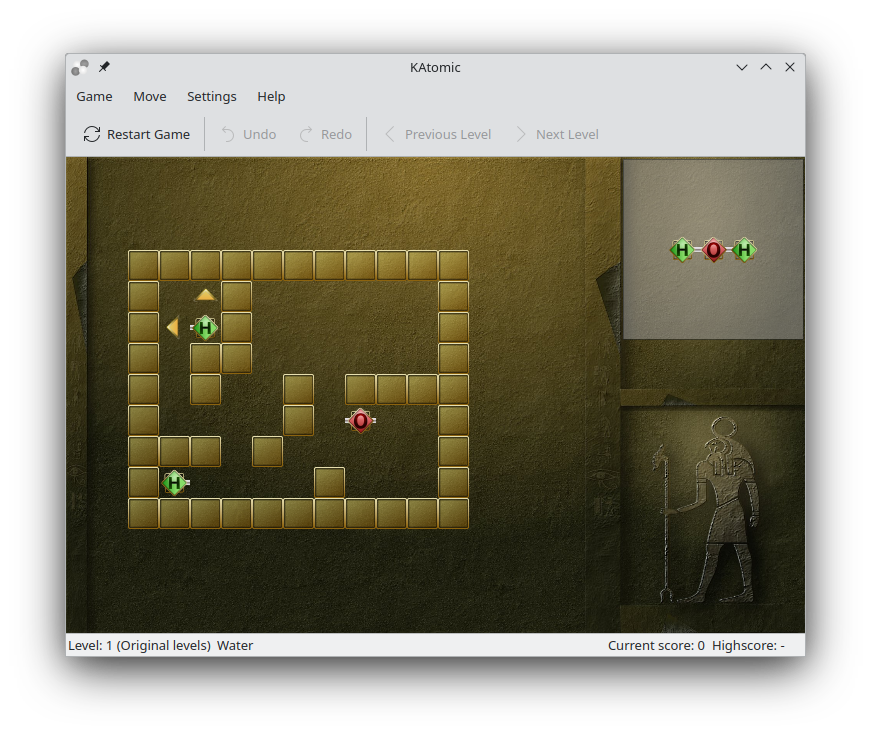



איך לשחק
Objective: Reassemble molecules from compound atoms by sliding them around.
Katomic will load level one once you start the game and you can begin playing right away.
To see how the molecule you are supposed to make looks like, take a look at the upper right corner. To play - click on an atom. You will see green arrows pointing in the directions where atom can move. To move the atom, click on the desired arrow. When an atom starts moving, it will not stop until it hits another atom or a wall, so make sure you think before you do your next move.
You can assemble your molecule wherever you like on the game board, but some places are easier to access than others. When the molecule is assembled, you can move to the next level.
מהדורות RSS
התקנות ליליות
ההתקנות הליליות של KAtomic זמינות להורדה גם משרתי ההפצה של KDE. הגרסאות האלו מיועדות לבדיקה. אפשר להצטרף ולסייע לנו להפוך אותן לטובות יותר!
גרסה מעורערת.
נוצר מהגרסה העדכנית ביותר של ענף הפיתוח.
- Flatpak
Download the flatpakref file and open it with your software center for installation or run the following in a terminal:
flatpak install --user --or-update https://cdn.kde.org/flatpak/katomic-nightly/org.kde.katomic.flatpakref - Windows
- macOS על ARM
- macOS על אינטל