
Haruna
Categorie: Multimedia
Altre piattaforme:
Multimedia
Altre piattaforme:  Windows
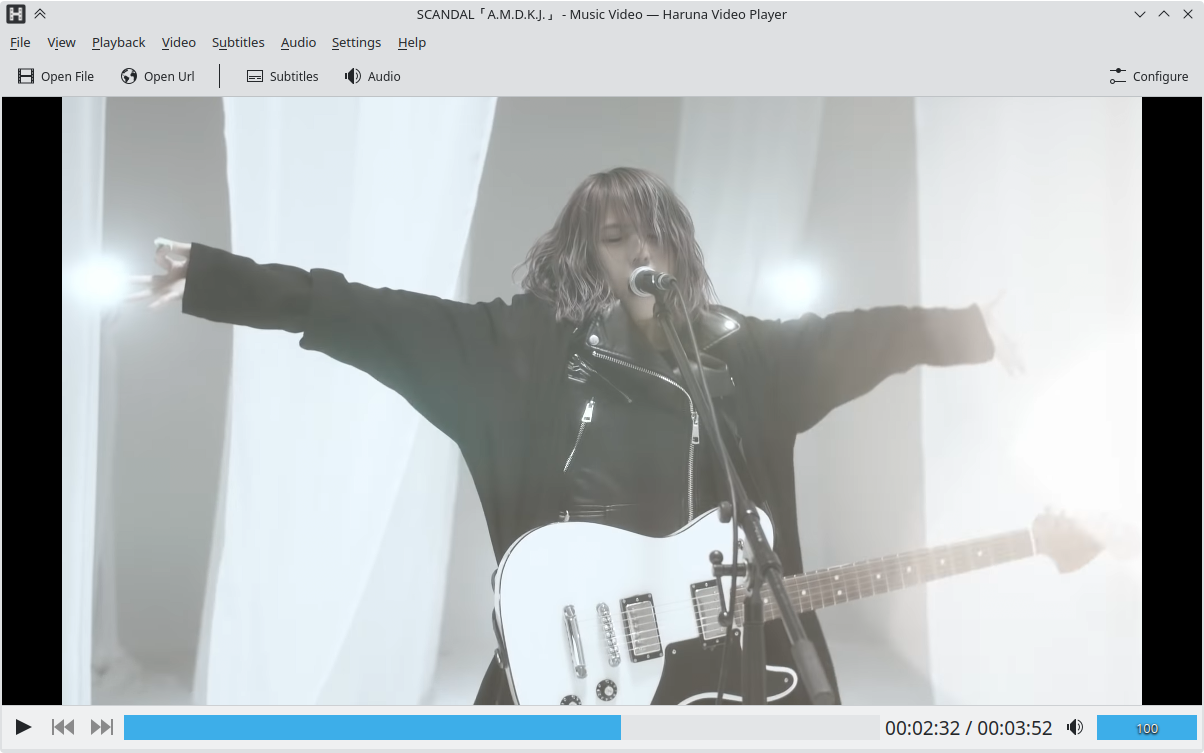 Finestra principale di Haruna
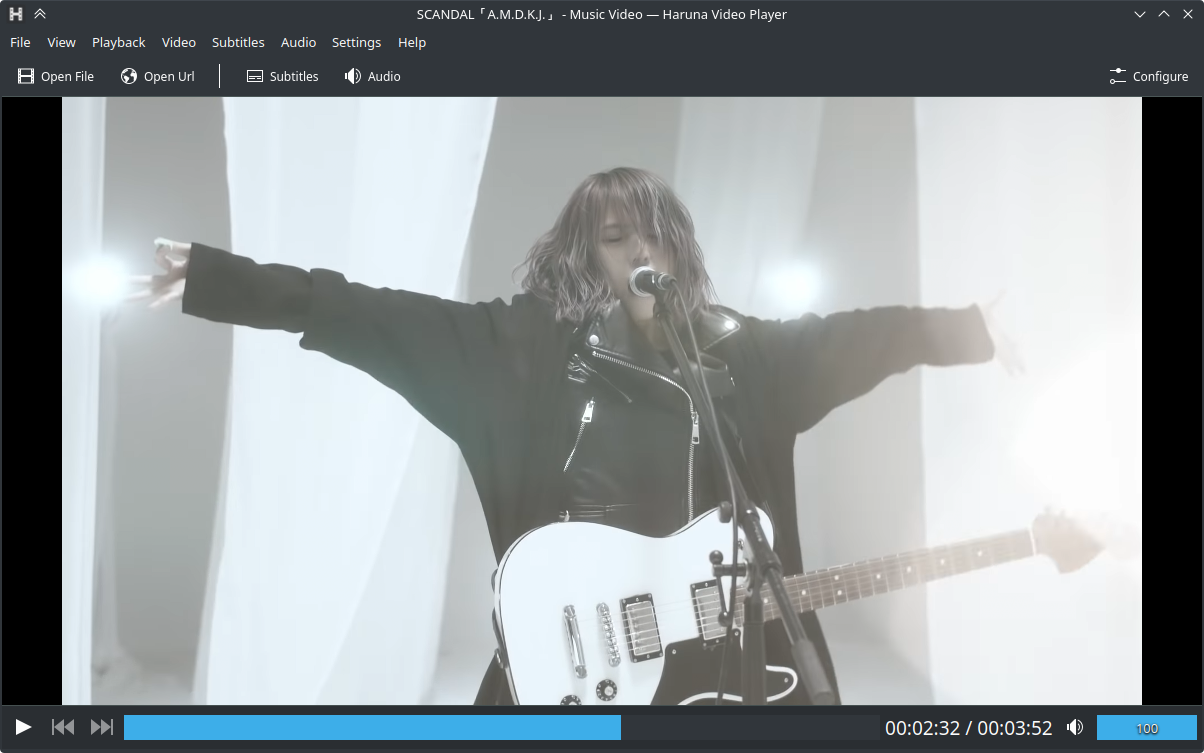 Finestra principale di Haruna, schema di colori Brezza scuro
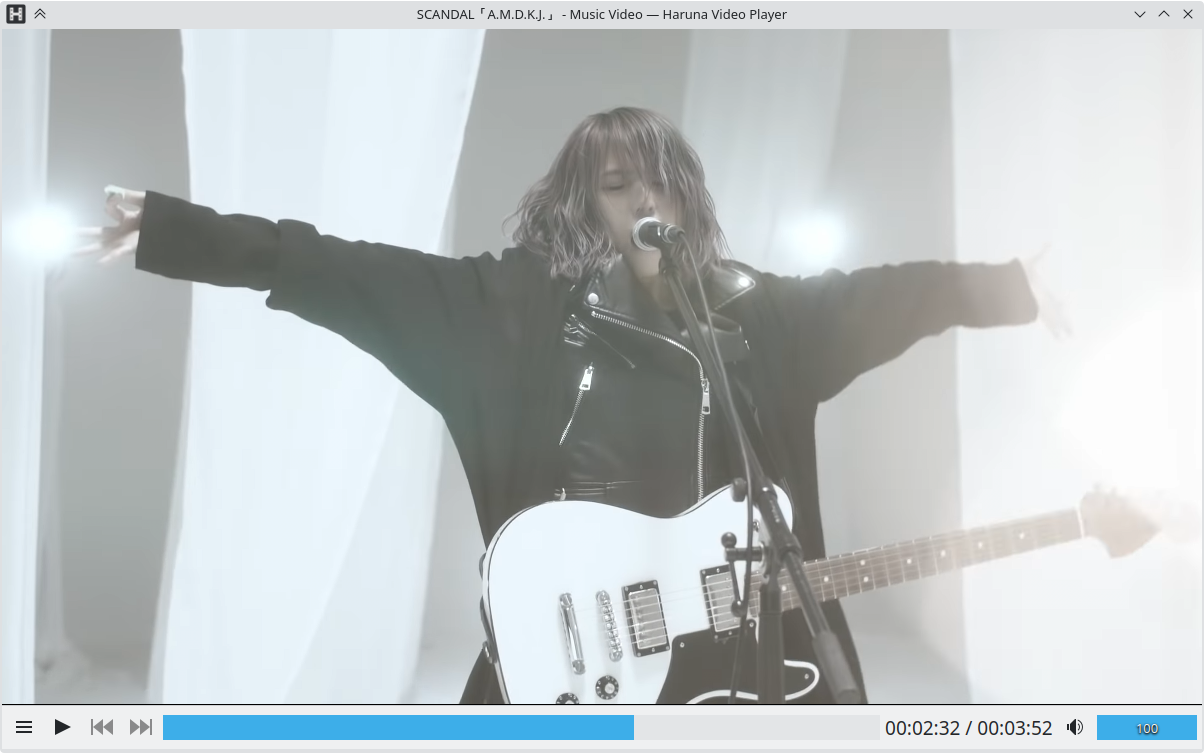 Haruna senza barra dei menu e barra degli strumenti
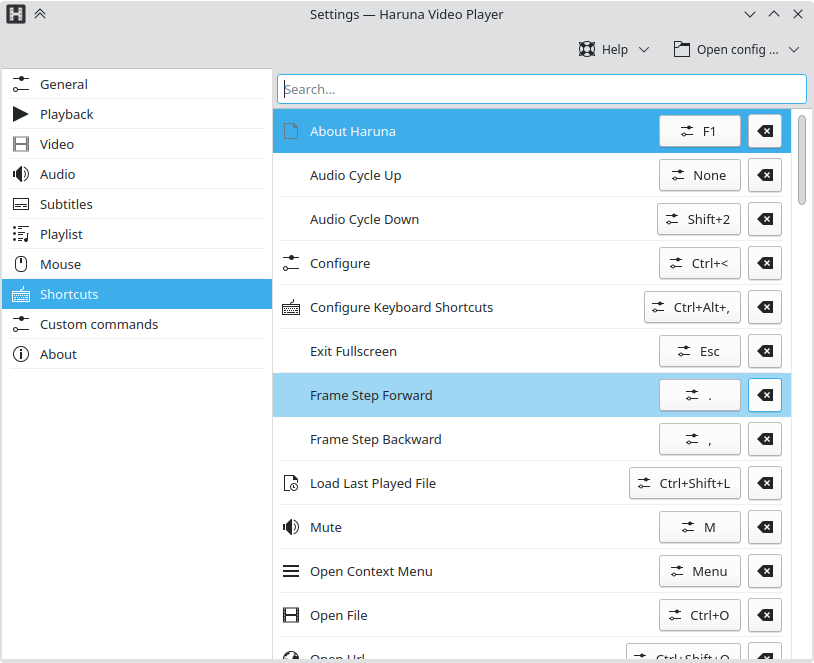 Finestra delle impostazioni di Haruna
Riproduttore multimediale open source ricco di opzioni e con grandi possibilità di personalizzazione.
Caratteristiche
- riproduce video in linea tramite youtube-dl
- supporta scalette youtube
- attiva e disattiva la scaletta al passaggio del mouse, la scaletta si sovrappone al video
- salto automatico dei capitoli contenenti determinate parole
- scorciatoie e pulsanti del mouse configurabili
- salto rapido al capitolo successivo tramite clic col pulsante centrale sulla barra di avanzamento



Rilasci RSS
1.8.1 2026-05-19
Caratteristiche
- apre più file da riga di comando, consente di aprire nel gestore file solo i file selezionati
- ferma l'azione, disponibile nel menu di riproduzione
- impostazione per abilitare l'avanzamento della barra delle attività
- mostra nome file/titolo nell'OSD quando si apre un file
- mpris: trova e imposta la copertina da un'immagine esterna per i file musicali sprovvisti di copertina interna
- animazione di caricamento personalizzata
- impostazione per la proprietà sub-border-style di mpv
- Scaletta: voce del menu per aprire file nell'applicazione MediaInfo (se installata)
- Scaletta: permette ordinamento crescente/decrescente per l'opzione Nessuno
- Scaletta: indicatore per riprendere la posizione della riproduzione sotto la durata
- Scaletta: maniglia di trascinamento elemento ora è mostrata al passaggio del mouse
Correzioni di errori
- nasconde pulsante menu capitoli quando non sono presenti capitoli
- pulsante ripristino famiglia di caratteri che non salva l'impostazione
- Scaletta: ripristina l'ultima scaletta attiva solo se si apre senza un file
- Scaletta: scorrimento lento per riprodurre l'elemento all'avvio
- Scaletta: clic che attivano l'elemento scaletta sotto la scheda
- Scaletta: nessun menu nelle schede
1.7.1 2026-01-14
Correzioni di errori
- corretta ricerca della scaletta
- corretto sfondo suggerimento con lo stesso colore del testo
1.7.0 2025-12-21
Caratteristiche
Scaletta
- aggiunti ordinamento e raggruppamento avanzati
- aggiunto menu contestuale per aprire file in Hana (generatore di miniature, solo se installato)
- l'ultima scaletta attiva viene impostata come visibile quando si avvia l'applicazione
Altro
- aggiunte impostazioni di replay gain
- miniatura mpris impostata solo per i file audio, questo permette all'anteprima della barra delle attività dell'SO di mostrare la reale finestra live
- ridotta la dimenzione dell'icona riproduzione nella scaletta compatta
Correzioni di errori
- corretta cartella banca dati che non veniva creata
- corretto suggerimento barra della ricerca che non si aggiornava alla modifica del file e il mouse non veniva spostato
- corretta eliminazione di comandi personalizzati
- corretto salvataggio ultimo URL aperto
1.6.0 2025-10-24
Caratteristiche
- Aggiunta opzione per ridimensionare la scaletta
- Spostata l'azione per aggiungere una nuova scaletta/scheda nella barra delle schede
- Spostata l'azione per aprire una scaletta nel menu «Aggiungi»
- Aggiunta un'icona per l'azione di riproduzione nell'intestazione della scaletta
- Impostazioni del mouse: l'azione assegnata a un evento del mouse può essere modificata
Correzioni di errori
- Corretta riproduzione ciclica della scaletta con un singolo file
- Corrette schede scaletta che non venivano salvate
- Corretta la rinomina delle scalette subito dopo la loro aggiunta
- Corretti pulsanti successivo/precedente che venivano disattivati durante l'aggiunta di elementi tramite trascinamento e rilascio nell'area «Aggiungi alla scaletta»
- Corretta azione precedente di riproduzione che non passava dal primo all'ultimo elemento della scaletta
- Corretta impossibilità di aggiungere nuova scheda scaletta quando yt-dlp non è installato
- Aggiunta soluzione temporanea per finestre di dialogo che non ricevono gli eventi dei tasti; i tasti esc e freccia non funzionavano
1.5.0 2025-09-30
Caratteristiche
Impostazioni
- Generale: aggiunta impostazione d'istanza singola per riprodurre un nuovo file quando lo si aggiunge alla scaletta
- Generale: rimosso il
- Scaletta: aggiunte impostazioni per controllare il comportamento della riproduzione
- Mouse: rivisto per permettere tasti modificatori
- Mouse: aggiunto supporto per i pulsanti del mouse Avanti e Indietro
- Sottotitoli: se il nome di una cartella relativa nell'elenco
- la finestra delle impostazioni ora ha altezza e larghezza minime
Scaletta
- aggiunto supporto per scalette multiple
- gli elementi possono essere riordinati manualmente tramite trascinamento e rilascio
- gli elementi possono essere selezionati, Ctrl+clic per selezionare più elementi, Maiusc+clic per selezionare un intervallo
- gli elementi possono essere filtrati
- aggiunte impostazioni per controllare il comportamento della riproduzione quando termina un file
- durante il salvataggio della scaletta l'estensione del file è impostata a m3u
- è possibile aggiungere file e cartelle tramite trascinamento e rilascio
- possono essere aggiunti più file tramite l'opzione nell'intestazione
- nasconde la scaletta quando il mouse lascia la finestra mentre è massimizzata, impedisce l'apertura della scaletta quando si sposta il mouse in un altro monitor
Riproduzione
- se un file non può essere riprodotto, ora viene mostrato un errore e la riproduzione si ferma anziché tentare di passare al file successivo (impedisce un potenziale ciclo infinito quando non sono riproducibili file nella scaletta)
- può riprodurre file che iniziano con un punto (file nascosti)
- viene mostrato un errore quando non riesce a scaricare la scaletta youtube
Altro
- mpris: aggiunto supporto per Shuffle e LoopStatus
- cambiata la finestrella a comparsa di selezione dell'azione per utilizzare Kirigami.SearchDialog
- sostituita l'icona casella numerica con una barra di avanzamento e un'etichetta
- l'area di rilascio del video è ora divisa in due parti
- l'area superiore aggiunge sempre alla scaletta predefinita
- l'area inferiore ripulisce la scaletta predefinita e aggiunge i file rilasciati e le cartelle, quando viene rilasciato soltanto un file si comporta come l'azione di apertura file (pulisce la scaletta e carica i file fratelli, se abilitata nelle impostazioni)
- i file recenti ora sono memorizzati in una banca dati sqlite
- anche le posizioni temporali utilizzate per ripristinare i video sono memorizzate nella banca dati
- la sospensione è bloccata anche in Windows
- ora tutte le stringhe dovrebbero essere traducibili
Correzioni di errori:
- corretta l'azione di riproduzione ciclica, l'OSD non la mostrava e la barra di avanzamento non evidenziava l'intervallo ciclico
- prima di caricare controlla se il file esiste
- corretto caricamento di sottotitoli scorretti quando si usano sottotitoli ricorsivi
- corretta barra di avanzamento che aumentava di altezza quando il menu dei capitoli diventava visibile
- corretto un errore in cui il video entrava in pausa dopo aver fatto clic sulla barra di avanzamento/ricerca
1.4.0 2025-04-15
Caratteristiche
- Aggiunta impostazione per ricercare ricorsivamente i sottotitoli. Ricerca le cartelle rispetto alla cartella del file in riproduzione e alle cartelle definite dall'impostazione `Carica i sottotitoli da`
- Aggiunto supporto per aprire le scalette di youtube da URL che contengono un ID scaletta
- Aggiunte azioni per ruotare in senso orario (Ctrl + r) e antiorario (Ctrl + e) i video
Correzioni di errori
- Corretti menu delle tracce che mostrano le tracce da file aperti in precedenza
- Corretti sottotitoli aggiunti tramite trascinamento e rilascio che non venivano aggiunti al menu dei sottotitoli
- Quando il cursore di avanzamento/ricerca è premuto il video è messo in pausa, corregge l'apertura continua del video successivo quando si trascina e mantiene fino alla fine
1.3.3 2025-02-24
Correzioni di errori:
- Corretto errore in cui l'applicazione che non riceveva il fuoco quando si apriva un file mentre era abilitata una singola istanza e il riproduttore era aperto
- Corretta sovrapposizione del titolo della finestra con l'informazione della durata nel piè di pagina
- Implementata inibizione dello schermo in Windows
1.3.2 2025-01-22
Correzioni di errori:
- Corrette scorciatoie non funzionanti con una lingua di sistema non inglese
- Corretto ripristino posizione della riproduzione
1.3.1 2025-01-21
Correzioni di errori:
- Corretta inibizione non funzionante dello schermo
- Corretta impostazione del volume tramite mpris2
1.3.0 2025-01-15
Il codice è stato riscritto in molte parti, accertati di segnalare qualsiasi errore si dovesse verificare. Esiste una voce di menu «Segnala errore» nel menu «Aiuto» o nelle impostazioni della pagina «Informazioni su».
Funzionalità:
- Cambiate le impostazioni collegate al ripristino della posizione di riproduzione, se hai modificato il valore predefinito devi rifarle
- Scaletta: aggiunte voci di menu contestuale per gli URL non locali da aprire nel browser e da rimuovere (dalla scaletta)
- Aggiunta impostazione (in Generale) per avviare il programma a schermo intero
- Aggiunta impostazione (nei Sottotitoli) per controllare la selezione automatica dei sottotitoli
- Cambiate azioni predefinite dei pulsanti del mouse sinistro e destro: il clic sinistro ora è riproduci/pausa e il clic destro apre il menu contestuale. Le azioni possono essere cambiate nella pagina delle impostazioni del mouse
- Trascinare la barra di ricerca/avanzamento aggiornerà la vista principale e anche l'anteprima della barra di ricerca
- Ridotta la dimensione minima della finestra
- Sostituita casella di controllo di decodifica hardware con un'opzione nella casella combinata/a tendina della decodifica hardware
Correzioni di errori:
- Migliorate prestazioni di scorrimento scaletta, scorciatoie e menu dei capitoli della barra di ricerca
- Corretto problema con scorciatoie delle impostazioni relative ai tasti modificatori (Ctrl, Alt, ecc.)
- Corrette tracce sottotitoli e audio attivi non verificati correttamente
- Rimossa barra degli strumenti di intestazione vuota dalla finestra delle impostazioni
- Corretto un errore per il quale il programma si bloccava quando caricava un file con molte tracce
- Animazione barra dei menu migliorata
- Il piè di pagina mobile ora si nasconde quando il mouse si sposta dall'applicazione
1.2.1 2024-09-27
Correzioni di errori:
- Corretta finestrella a comparsa di anteprima delle miniature che non si ridimensionava dopo aver disabilitato le anteprime
- Uso dello stesso componente del volume per entrambi gli stili di piè di pagina
1.2.0 2024-08-26
Funzionalità:
- Aggiunto stile barra degli strumenti inferiore/piè di pagina mobile
- Rimosso il docbook e spostato il suo contenuto nei suggerimenti
- Clic con pulsante centrale sulla scaletta scorre all'elemento in riproduzione
1.1.2 2024-06-03
Correzioni di errori:
- Disabilitati menu e pulsanti di selezione della traccia quando non vi sono tracce da selezionare
- Corretta attivazione/disattivazione del comando personalizzato
- Riaggiunte opzioni «scorri all'elemento in riproduzione» e «Cestina file» al menu contestuale della scaletta, perdute durante la conversione a Qt6
- Corrette alcune proprietà mpv che non venivano impostate correttamente all'avvio
- Corretta la resa video in Windows
1.1.1 2024-05-17
Correzioni di errori:
- Menu dei sottotitoli che non includeva i sottotitoli aggiunti manualmente
- Durata nella scaletta risultante 0
- Finestrella a comparsa che era visibile per i file audio
- Ciclo AB che non si azzerava
1.1.0 2024-04-19
Funzionalità:
- Impostazione per aprire gli elementi della scaletta con un solo clic
Correzioni di errori:
- Apertura dei video in una finestra separata quando si utilizza la versione 0.38.0 di mpv
- Azzeramento del muto quando si apre un nuovo file
- Riproduzione dell'elemento nella scaletta non più in grassetto, il che ne rendeva difficile la lettura sotto certe condizioni
1.0.2 2024-03-25
Correzioni di errori:
- Impostazione Mostra/nascondi nella barra degli strumenti Scaletta
- Sottomenu delle tracce nei menu Audio e Sottotitoli che risultavano vuoti
- Blocco quando si apriva il menu hamburger
1.0.1 2024-03-14
Conversione a Qt6.
Alcune opzioni hwdec sono state rimosse, se richieste possono essere impostate nelle impostazioni «Comandi personalizzati» come `set hwdec decoding_method_name` e scelto «Esegui all'avvio»
Funzionalità:
- L'apertura degli elementi dalla scaletta è più veloce
- Se l'impostazione «File recenti max.» è a zero, i file recenti sono rimossi dal file di configurazione
Correzioni di errori:
- L'apertura del file tramite l'azione «Apri file» non riproduceva il file
- L'apertura del file della scaletta dall'intestazione della scaletta non eseguita nulla
0.12.3 2023-11-15
Correzioni di errori:
- Corretta finestra di dialogo di scelta del sottotitolo che non si apriva nella cartella in cui si trova il file in riproduzione
- Corretta scaletta che copriva la barra degli strumenti inferiore/piè di pagina e rendeva difficile la chiusura della scaletta quando si attiva/disattiva col mouse disattivato
- Corretta ripulitura non funzionante della scaletta
- Corretto URL non aggiunto ai file recenti quando aperto tramite l'azione «Apri URL»
Funzionalità:
- Aggiunta scorciatoia «Escape» per chiudere la finestra delle impostazioni
0.12.2 2023-11-02
Correzioni di errori:
- Non viene mostrata la finestrella a comparsa di anteprima quando non viene caricato alcun file o durante la riproduzione di un video in linea
- Corrette miniature non funzionanti nella scaletta
0.12.1 2023-08-31
Correzioni di errori:
- Corretto file che entra in pausa all'avvio in determinati casi
- Corretto colore del testo nel suggerimento della barra di avanzamento
- Corrette azioni Sposta video su/giù e Riduci carattere sottotitoli
- Corretta apertura scaletta sopra il video quando l'impostazione di sovrapposizione è disattivata
0.12.0 2023-08-25
Funzionalità:
- Aggiunta miniatura di anteprima alla barra di avanzamento, può essere configurata nella pagina delle impostazioni Generale
- Aggiunta impostazione per consentire solo un'istanza, può essere configurata nella pagina delle impostazioni Generale
- Aggiunta finestra a comparsa di selezione dell'azione in cui puoi ricercare tutte le azioni disponibili e attivarle (apri con Ctrl+` (backtick, accento grave), simile alla KCommandBar)
- Aggiunta impostazione per ridimensionare automaticamente la finestra alla risoluzione video, in Wayland la dimensione massima non è limitata
- Aggiunta impostazione per nascondere la barra degli strumenti della scaletta
- Aggiunto voce del menu per ciascuna pagina delle impostazioni nel menu Impostazioni
- Il percorso della schermata viene mostrato nell'OSD quando si utilizza mpv 0.36.0 o versioni successive
- Aggiunta voce «Scorri all'elemento in riproduzione» al menu contestuale della scaletta
- Aggiunta voce «Apri URL» al menu contestuale della scaletta per gli URL in linea
- Mostra/nascondi barra dei menu, barra degli strumenti superiore e inferiore ora è animato
- Aggiunte voci di menu di selezione traccia al menu hamburger
Correzioni di errori:
- Corretto blocco non eseguito dell'inibizione (spegnimento dello schermo, sospensione, ecc.) durante la riproduzione
0.11.3 2023-07-12
Correzioni di errori:
- Corretti pulsanti di scelta colore nelle impostazioni dei sottotitoli che non riflettevano il colore attuale
- Corrette modifiche del colore dei sottotitoli che non venivano applicate subito
0.11.2 2023-07-08
Correzioni di errori:
- Corretto OSD che non veniva mostrato
- Corretta l'aggiunta di elementi alla scaletta
- Corretti valori sbagliati che venivano mostrati nell'OSD
- Corretta impostazioni dimensione caratteri sottotitoli che non veniva caricata dalla configurazione
- Corretta dimensione modifica barra avanzamento quando non si utilizza carattere a larghezza fissa/monospace
- Corretta barra degli strumenti inferiore/piè di pagina che non viene nascosta quando si sposta al monitor sotto, mentre Haruna è a schermo intero
0.11.1 2023-05-28
Correzioni di errori:
- Corretta azione uscita non funzionante
- Corretto OSD che non veniva mostrato
- Corretta scaletta che che si ripete quando l'impostazione di ripetizione è disattiva
0.11.0 2023-05-14
Codice mpv rivisto per migliorare le prestazioni, sono presenti ancora alcuni bug, segnalali a bugs.kde.org
Funzionalità:
- Durante il ripristino dallo stato minimizzato lo stato della riproduzione è impostato a quello in riproduzione quando si è minimizzato (si applica solo se è attiva l'opzione «Pausa se minimizzi»)
- Aggiunta pagina impostazioni Debug, che mostra i percorsi ai file di configurazione e ne consente l'apertura
Correzioni di errori:
- Corretta apertura non possibile dei file il cui percorso contiene determinati caratteri
- Corretta apertura non possibile dei file .ts e .rm
- Corretti alcuni campi di testo che non salvavano i valori sotto determinate circostanze
- Corretta impostazione formato schermata non funzionante
- Corretto menu file recenti che non si chiudeva
- Corretto menu contestuale scaletta che non chiude quando la scaletta si nasconde
0.10.3 2023-01-29
Funzionalità:
- Scaletta: aggiunte opzioni per aprire i file m3u (senza supporto per gli attributi estesi), aggiunti file e URL (sarà visualizzato solo il percorso URL, nessun titolo, nessuna durata), ordina, pulisci e salva la scaletta
- Scaletta: aggiunto menu contestuale per gli elementi della scaletta
- Scaletta: aggiunta impostazione per ricordare lo stato della scaletta
- Sottotitoli: aggiunta impostazione per rendere coi bordi neri i sottotitoli
- Video: aggiunta impostazione per configurare una copertina predefinita per i file musicali
- Aggiunta opzione a riga di comando per ignorare l'impostazione di selezione del formato ytdl (questa opzione è sovrascritta se viene cambiata l'impostazione dell'interfaccia)
- Aggiunta miniatura MPRIS
Correzioni di errori:
- File recenti: ordinamento corretto, mostra dei duplicati, ripulitura, aggiunta quando l'elenco è pieno
- Corretto OSD che viene mostrato senza testo
- Scaletta: corretta impostazione «Aumenta la dimensione carattere se a schermo intero» non funzionante
- Scaletta: rimossa impostazione rowHeight
Correzioni di errori 0.10.1:
- Corretto riproduzione automatica al file successivo della scaletta quando il file attuale termina
- Corretto file aperto che non viene riprodotto quando l'impostazione «Carica automaticamente i video dalla stessa cartella» è disabilitata
Correzioni di errori 0.10.2:
- Corretto crash quando l'impostazione «File recenti max.» era impostata a zero.
Correzioni di errori 0.10.3:
- Corretto ultimo file riprodotto talvolta non memorizzato.
- Corrette durate superiori alle 24 ore non visualizzate correttamente e con le etichette dei capitoli scombinate.
- Il menu dei capitoli è stato riscritto per essere più reattivo con molti capitoli.
- Corretta apertura percorsi relativi da un file di scaletta.
- Corretta apertura file che contengono caratteri #.
0.9.3 2022-10-06
Funzionalità della versione 0.9.0:
- Rivista la configurazione delle scorciatoie, ora disponibile nella finestra assieme alle altre impostazioni, anziché venire aperta in una finestra separata
- Il menu hamburger ora mostra solo alcune azioni, il resto è disponibile in un sottomenu
- Quando la barra dei menu è nascosta, il menu hamburger viene mostrato nella barra degli strumenti/dell'intestazione e quando l'intestazione è nascosta viene mostrato nel piè di pagina
- Aggiunto appropriato menu contestuale per i video
- Aggiunta impostazione per avviare la riproduzione quando si riprende la riproduzione di un file
- Aggiunta impostazione per impostare il numero massimo di file recenti
- Aggiunta opzione per ripulire i file recenti
- Aggiunta impostazione per ripristinare la dimensione e la posizione della finestra
- Aggiunte impostazioni per personalizzare carattere, dimensione, stile (grassetto, corsivo), colore, ombra colore, scostamento ombra, colore bordo e larghezza bordo dei sottotitoli
- Spostate impostazioni di ricerca alla pagina delle impostazioni di riproduzione
- Spostata impostazione passo volume alla pagina delle impostazioni audio
- I comandi personalizzati che sono eseguiti all'avvio possono essere disattivati in modo da non essere impostati all'avvio successivo
- Nelle impostazioni del mouse viene mostrato il testo dell'azione, che è traducibile, al posto del suo nome interno
Funzionalità della versione 0.9.2:
- Aggiunta azione per caricare un sottotitolo da una finestra di dialogo di scelta file
Correzioni di errori 0.9.0:
- L'attivazione e la disattivazione della barra dei menu e della barra degli strumenti/intestazione tramite le azioni ricorda lo stato al successivo avvio
- Ripristino della posizione temporale per i video di youtube
- Migliorata inizializzazione mpv per permettere un miglior supporto di decodifica hardware
- La proprietà del formato Ytdl può essere sovrascritta da un comando personalizzato
Correzioni di errori 0.9.1:
- Corrette due azioni danneggiate nel menu globale
- Traduzioni corrette
Correzioni di errori 0.9.2:
- Migliorata disposizione da destra a sinistra
- La finestra ora viene ridimensionata quando si cambia la dimensione dei caratteri del sistema
- Corretto un crash quando si cambia l'impostazione del numero massimo di file recenti a 0
- Corretti impostazione cartelle sottotitoli (queste cartelle sono utilizzate per ricercare i sottotitoli)
- Migliorato ridimensionamento dei caratteri di informazione durata nel piè di pagina, ora la sua dimensione dovrebbe essere più vicina a quella degli altri componenti presenti nel piè di pagina
- Corretto un problema di determinazione dei tipi mime, che faceva sì che i file video .ts venivano trattati come file di testo
- Corretta impossibilità di fare clic sul pulsante «aggiungi comando personalizzato» quando non sono presenti comandi personalizzati
Correzioni di errori 0.9.3:
- Corretta scaletta che non carica video dalla stessa cartella del file aperto
0.8.0 2022-04-20
Funzionalità:
- Supporto per il menu globale
- Impostazione mettere in pausa la riproduzione se minimizzato
- Impostazione per configurare l'intervallo di salvataggio della «posizione temporale»
- Menu File recenti dentro il menu File
- Altre azioni nella barra dei menu
- Azione per caricare l'ultimo file riprodotto (Ctrl+Maiusc+L), utile quando Carica ultimo file riprodotto all'avvio è disabilitato
- Azione per riavviare riproduzione/ricerca dall'inizio (tasto F5)
- Azione per ricercare la posizione Guarda più tardi (Ctrl+Maiusc+P), utile quando Riprendi riproduzione all'avvio è disabilitata
Correzioni di errori:
- Erano presenti due impostazioni «ricorda posizione temporale», che eseguivano cose diverse, quella all'avvio rinominata "riprendi riproduzione"
- Corretto un caso in cui la scaletta non poteva essere più quando il mouse ci passava sopra
- OSD: quando il file non può essere riprodotto, mostra il nome file se non è presente il titolo
- Riproduzione a scatti causata da dischi lenti
- Elementi della scaletta che collassano uno dentro l'altro
0.1.0 2020-02-28
Installatori della versione nightly
Gli installatori della versione nightly di Haruna sono disponibili anche per lo scaricamento da KDE CDN. Queste versioni sono destinate a scopi di test. Partecipa e aiutaci a renderli migliori!
Versione non stabile.
Generato dall'ultima versione del ramo di sviluppo.
- Flatpak
Scarica il file flatpakref e aprilo con il tuo centro software per l'installazione oppure esegui il seguente comando in un terminale:
flatpak install --user --or-update https://cdn.kde.org/flatpak/haruna-nightly/org.kde.haruna.flatpakref - Windows