
KOrganizer
Категории: Офис
Офис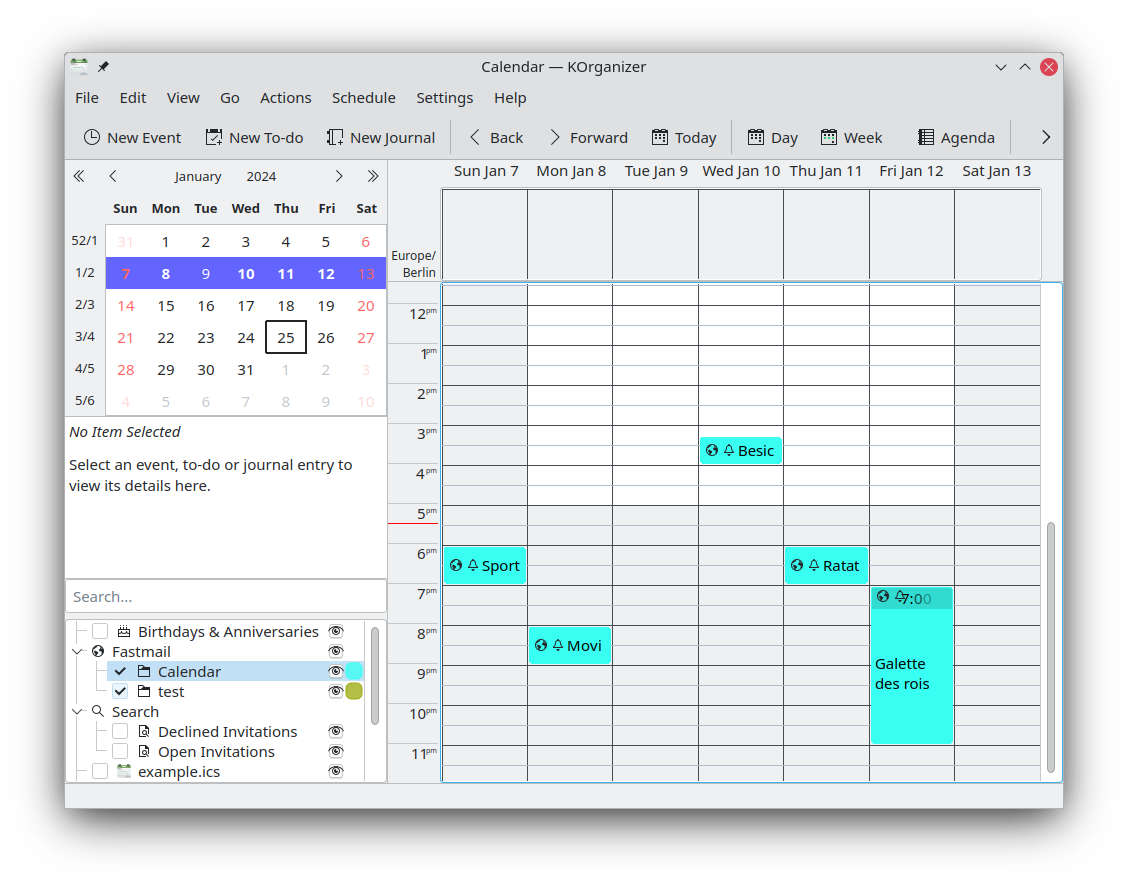
KOrganizer является одним из компонентов набора приложений электронного секретаря Kontact. KOrganizer позволяет управлять событиями и задачами, уведомлениями, экспортировать данные для публикации в Интернете, прозрачно использовать данные, расположенные на сетевых ресурсах, планировать расписания групп, выполнять импорт и экспорт данных и многое другое. Приложение поддерживает совместную работу с различными службами календарей, такими как Nextcloud, Kolab, Google Календарь и другими. KOrganizer может быть настроен под ваши нужды и является частью набора приложений Kontact — полнофункционального решения для управления личными данными. Для хранения и обмена данными календарей приложение использует два основных стандарта: vCalendar и iCalendar.
Возможности:
- Работа с произвольным числом календарей и списков задач;
- Поддержка различных механизмов хранения данных;
- Отмена и возврат действий;
- Показ задач в расписании на день;
- Прикрепление файлов к событиям и задачам;
- Быстрое создание задач и событий;
- Печать календарей.

Выпуски RSS
6.8.0 2026-08-20
Исправления для CalDAV
- Календари, созданные в KOrganizer, создаются на сервере DAV
- Изменения названия и цвета календаря в KOrganizer передаются на сервер DAV
- Корректная обработка создания, редактирования и удаления исключений повторяющихся событий
Исправления ошибок
- Исправлено переключение напоминаний из меню;
- Режим просмотра «Расписание»: улучшено вертикальное выравнивание меток времени по сетке
Возможности
- Для ускорения и упрощения создания новых задач, а также для снижения вероятности их сохранения в неправильной папке можно указать календарь задач по умолчанию. Возможность задания календаря событий по умолчанию поддерживалась и ранее. Используйте пункт контекстного меню списка календарей «Использовать как календарь задач по умолчанию».
- Режим просмотра «Расписание»: возможность рисовать более жирные горизонтальные линии сетки каждые два часа. Для включения этой возможности отметьте параметр «Рисовать жирные горизонтальные линии сетки для чётных часов» во вкладке «Вид» → «Расписание».
- Реализована возможность скрытия праздников, относящихся к определённым категориям, например, религиозных праздников. См. раскрывающийся список «Категории» в разделе «Праздники» на вкладке «Время>Региональные».
- Режим просмотра «Месяц»: для единообразия праздники, выпадающие на рабочие дни, больше не скрываются
- Режим просмотра «Месяц»: добавлен параметр, позволяющий скрывать праздники. Чтобы включить такое поведение, снимите флажок «Показывать праздники в представлении месяца» на вкладке «Вид → Месяц».
- Режим просмотра «Месяц»: добавлен параметр, позволяющий использовать пользовательский цвет фона праздника в качестве цвета фона ячейки даты, если на эту дату выпадает хотя бы один праздник. Чтобы включить это поведение, установите флажок «Использовать цвет фона праздника для дат, на которые выпадает праздник» на вкладке «Вид → Месяц».
- Режим просмотра «Месяц»: добавлен параметр показа времени начала и окончания. Ранее поддерживалось только показ времени начала. Чтобы включить этот параметр, установите флажок «Показывать время начала и окончания в элементах вида месяца» на вкладке «Вид» -> «Вид месяца».
- Режим просмотра «Расписание»: подчёркивание даты в заголовке столбца «Сегодня»
- Режим просмотра «Расписание»: возможность показывать места событий в элементах расписания. Чтобы включить её, установите флажок «Показывать места событий в элементах расписания» на вкладке «Вид → Расписание».
- Добавлена возможность задавать классификацию доступа по умолчанию (общедоступный, конфиденциальный или личный) при создании событий, задач и записей дневника. Выберите нужные параметры в выпадающих списках «Общие -> Персональная классификация доступа по умолчанию».
- Режим просмотра «Задачи»: мини-список с задачами больше не показывается на боковой панели, но его можно просматривать во всех других представлениях, если параметр «Настройка->Боковая панель->Задачи» включён.
- Шаблоны: добавление меток (категорий) в шаблоны событий
6.7.0 2026-04-16
Возможности
- Напоминания по умолчанию включены для всех новых событий и задач. Чтобы отключить это поведение, снимите флажок «Включить напоминания» на вкладке «Время->Значения по умолчанию» в параметрах.
- Режим просмотра «Месяц»: заголовок с месяцем и годом больше не показывается для экономии вертикального пространства и устранения избыточности
- Режим просмотра «Месяц»: слегка изменён цвет заголовков дней вне текущего месяца
- Режим просмотра «Месяц»: элементы навигации в правом нижнем углу удалены в пользу улучшенной панели навигации приложения
- Режим просмотра «Месяц»: можно изменить цвет фона ячейки сегодняшней даты. Для настройки цвета задайте параметр «Цвет фона сегодняшнего дня в режиме месяца» в разделе «Цвета и шрифты»
- Панель навигации: улучшена добавлением прокрутки по неделям и возможностью показа/скрытия боковой панели для каждого представления
- Панель навигации: добавлена кнопка для перехода к текущей дате
- Режим просмотра «Расписание»: события с короткой продолжительностью показываются с временем начала в дополнение к их описанию
- Режим просмотра «Расписание»: возможность показывать описания событий в элементах расписания. Чтобы включить её, установите флажок «Показывать описания событий в элементах расписания» на вкладке «Вид → Расписание».
- Поиск: параметры поиска сохраняются и восстанавливаются
6.6.0 2025-12-11
Исправления ошибок
- Редактор событий: автоматическая сортировка меток в редакторе меток
Возможности
- Режим просмотра «Расписание»: добавление контекстного меню для показа или скрытия меток времени для системного часового пояса также и с правой (или левой) стороны
- Редактор событий: обнаружение и предупреждение о создании событий в прошлом
- Редактор событий: добавление поддержки смайликов
6.5.0 2025-08-14
Общие
- Замена формулировки «рабочее расписание» на «расписание на неделю» (подходит как работающим, так и неработающим пользователям)
- Одно и то же первоначальное время начала «Нового события» во всех представлениях
- Улучшение обработки календаря событий по умолчанию
Исправления ошибок
- Для событий с длинным перечнем исключённых дат больше не создаются огромные всплывающие подсказки
- Исправление адреса эл. почты организатора для событий с участниками
- Режим просмотра «Расписание»: показ событий без длительности как 30-минутных (а не 15-минутных)
Возможности
- Добавление меню «Что нового?»
- Запоминание текущего представления
- Добавление диалога выбора даты в меню «Переход»
- Режим просмотра «Расписание»: объединение временных диапазонов («День», «Следующие X дней», «Рабочее расписание», «Неделя») в кнопке инструмента «Расписание»
- Режим просмотра «Расписание»: добавление параметра, позволяющего включать или отключать часы в 24-часовом формате (армейский стиль), в контекстное меню меток времени
- Режим просмотра «Расписание»: добавление контекстного меню для создания нового события или задачи
- Режим просмотра «Задачи»: добавление параметров, позволяющих включать или отключать выполнение и напоминания, в контекстное меню
- Режим просмотра «Задачи»: сохранение и восстановление значения параметра полноэкранного просмотра
- Режим просмотра «Задачи»: сохранение и восстановление значения параметра просмотра в виде плоского списка
- Календарь: добавление параметра для скрытия номеров недель в раздел Настроить → Вид
- Календарь: параметр «Номера недель выбирают рабочую неделю в режиме рабочей недели» включён по умолчанию
- Редактор событий: запоминание/восстановление геометрии в диспетчере шаблонов
- Редактор событий: поддержка вложения файлов перетаскиванием
- Сохранение последнего расположения папки экспорта в диалоге экспорта календаря
- Сохранение последнего расположения папки импорта в диалоге импорта календаря
- Добавление файла календаря: сетевые календари всегда доступны только для чтения
- Добавление файла календаря: нельзя указывать пустой путь к файлу
- Настройка DAV: в диалоге возможен просмотр пароля во время редактирования
- Настройка DAV: в мастере показаны значки для различных поставщиков
- Настройка DAV: в мастере обновлён список поставщиков