
KOorganizer
Categories: कार्यालयः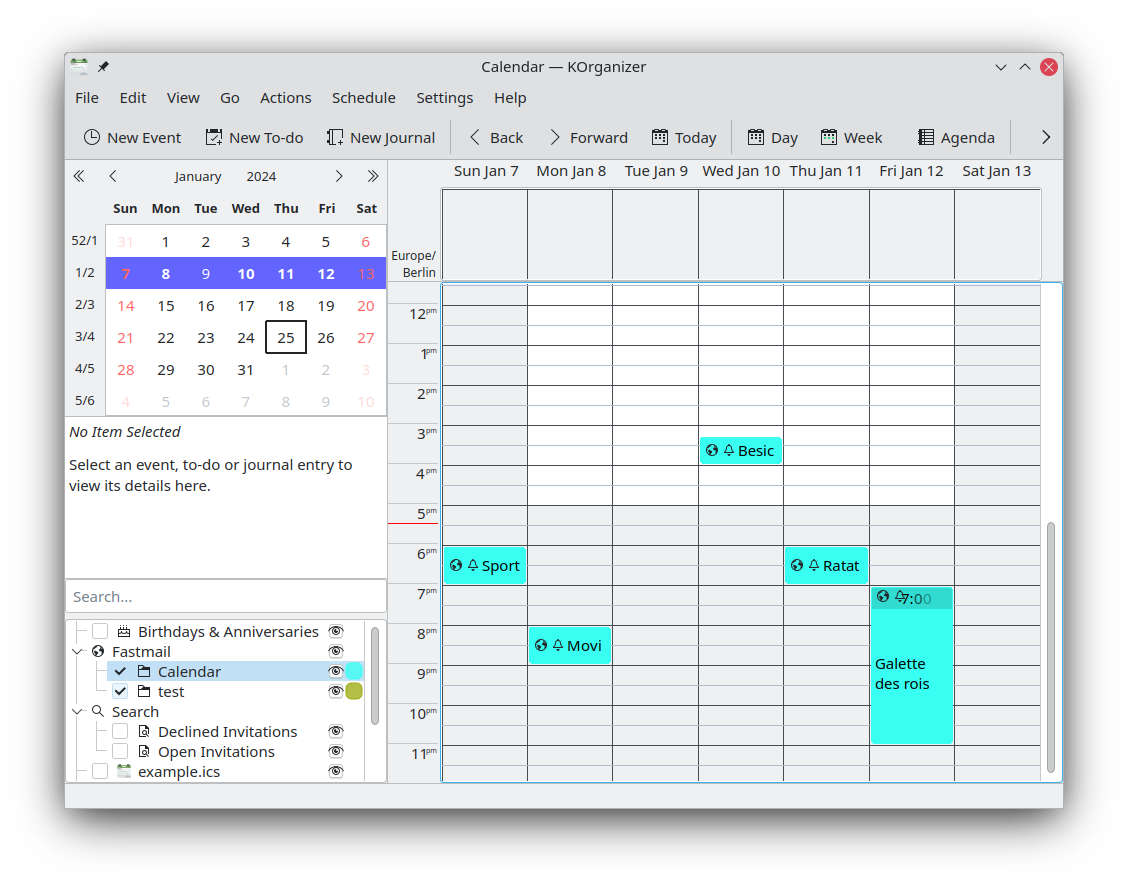
KOrganizer Kontact इत्यस्य पञ्चाङ्गस्य समयनिर्धारणस्य च घटकः अस्ति । एतत् घटनानां कार्याणां च प्रबन्धनं, अलार्मसूचना, जालनिर्यातः, आँकडानां संजालपारदर्शकं निबन्धनं, समूहनिर्धारणं, कैलेण्डरसञ्चिकानां आयातनिर्यातनम् इत्यादीनि प्रदाति इदं नेक्स्टक्लाउड्, कोलाब्, गूगल कैलेण्डर् इत्यादिभिः विविधैः कैलेण्डर्-सेवाभिः सह मिलित्वा कार्यं कर्तुं समर्थम् अस्ति । KOrganizer भवतः आवश्यकतानुसारं पूर्णतया अनुकूलनीयः अस्ति तथा च Kontact suite इत्यस्य अभिन्नः भागः अस्ति, यस्य उद्देश्यं भवतः व्यक्तिगतदत्तांशस्य आयोजनार्थं सम्पूर्णं समाधानं भवितुम् अस्ति KOrganizer कैलेण्डरदत्तांशस्य संग्रहणस्य आदानप्रदानस्य च प्रमुखमानकद्वयं vCalendar तथा iCalendar इति समर्थयति ।
गुणाः:
- बहुविधपञ्चाङ्गानां todo सूचीनां च समर्थनम्
- भण्डारणप्रतिरूपम्
- पूर्ववतं कुर्वन्तु पुनः कुर्वन्तु
- एजेण्डा दृष्ट्या सह टोडो एकीकरणम्
- इवेण्ट्स् तथा टोडोस् कृते संलग्नकाः
- द्रुत todo तथा इवेण्ट् प्रविष्टयः
- मुद्रणसमर्थनम्

Install on
Linux
Releases RSS
6.8.2
2026-10-08
6.8.1
2026-09-10
6.8.0 2026-08-20
CalDAV Fixes
- Calendars created in KOrganizer are created on the DAV server
- Calendar name/color changes in KOrganizer are replicated on the DAV server
- Properly handle creating/editing/deleting recurring event exceptions
Bug Fixes
- Fixed reminder toggling from menus
- Agenda view: improved timelabel vertical alignment with grid
Features
- A default To-do calendar can be specified to make creating new to-dos faster and easier with less chance of filing them into the wrong folder. Setting a default Event calendar has been supported for a long time. See the Calendar Manager context menu "Set as Default Todo Calendar"
- Agenda view: optionally draw bolder/fatter horizontal grid lines every two hours. To enable this behaviour, check the "Draw bold horizontal grid lines for the even hours" option in the View->Agenda View tab
- It is now possible to hide holidays that belong to specific categories, for example to hide religious holidays. See the Categories combobox in the Holidays section of the Time->Regional tab
- Month view: for the sake of consistency, holidays that land on a workday are no longer hidden
- Month view: An option was added to allow hiding holidays. To enable this behavior, uncheck the "Display holidays in the month view" option in the Views->Month View tab
- Month view: An option was added to allow using the custom holiday color as the date box background color if at least one holiday lands on that date. To enable this behavior, check the "Use the Holiday background color when a holiday lands on the date" option in the Views->Month View tab
- Month view: An option was added to show start-time and end-times. Previously only showing the start-time was supported. To enable this option, check the "Show the start-time and the end-time in month view items" option in the View->Month View tab
- Agenda view: underline today's column header date
- Agenda view: optionally show the incidence locations inside the agenda items. To enable this behavior, check the "Show incidence locations in agenda view items" option in the View->Agenda View tab
- Options for setting default access classifications (Public, Confidential or Private) when creating new Events, To-dos and Journals have been added. Select your preferences in the "General->Personal Default Access Classification" comboboxes.
- Todo view: the mini todolist is no longer shown in the sidebar; the mini todolist can still be shown in all the other views if the Settings->Sidebar->Show Todo List option is enabled
- Templates: tags (categories) can be added to incidence templates
6.7.3
2026-07-02
6.7.2
2026-06-04
6.7.1
2026-05-07
6.7.0 2026-04-16
Features
- Reminders are enabled by default for all new events and to-dos. To disable this behavior, uncheck the Enable reminders options in the settings Time->Default Values tab
- Month view: no longer display the month year header to save vertical space and remove redundancy
- Month view: use a slightly different color for drawing the day headers for days outside of the currently selected month
- Month view: the navigation controls on the lower right side are removed in favor of the improved application navigator bar
- Month view: the background color for today's date cell can be changed. To configure the color, set the "Month view today background color" in the Colors and Fonts settings
- Navigator bar: improved by adding week scrolling and showing/hiding the sidebar on a per-view basis
- Navigator bar: added a button to scroll the view to the current date
- Agenda view: events with short durations are displayed with their starting time in addition to their summary
- Agenda view: optionally show the incidence descriptions inside the agenda items. To enable this behavior, check the "Show incidence descriptions in agenda view items" option in the View->Agenda View tab
- Search: the search settings are saved/restored
6.6.3
2026-03-05
6.6.2
2026-02-05
6.6.1
2026-01-08
6.6.0 2025-12-11
Bug Fixes
- Incidence editor: the tags are sorted alphabetically in the tags editor
Features
- Agenda view: added timelabels context menu to show/hide time labels for the system timezone on the right (or left) side as well
- Incidence editor: detect and warn about creating incidences in the past
- Incidence editor: add emoji support
6.5.3
2025-11-06
6.5.2
2025-10-09
6.5.1
2025-09-11
6.5.0 2025-08-14
General
- Semantics are changed from a "working schedule" concept to a "week schedule" concept to accommodate non-working users
- Initial "New Event" start times are consistent across all the views
- Improved default event calendar handling
Bug Fixes
- Incidences with a long excluded dates list no longer create huge tooltips
- Fixed the organizer email address for incidences with attendees
- Agenda view: events without a duration are displayed as 30 long (rather than 15 minutes long)
Features
- Add What's New menu
- The current view is remembered
- Add a Date Picker dialog available on the Go menu
- Agenda view: consolidated the "Day", "Next X Days", "Work Schedule", "Week" time ranges into the Agenda tool button
- Agenda view: added timelabels context menu option to toggle a 24-hour (military style) clock
- Agenda view: added context menu to create new Event or To-do
- To-do view: added context menu options for toggling completion and reminders
- To-do view: save/restore fullview setting
- To-do view: save/restore flatview setting
- Date navigator: added an option in the Configure->Views settings for hiding the week numbers
- Date navigator: the "Week numbers select a work week when in work week mode" setting is true by default
- Incidence editor: remember/restore the template manager geometry
- Incidence editor: support drag-and-drop attachments
- The export calendar dialog remembers its last export folder location
- The import calendar dialog remembers its last import folder location
- Add calendar file: remote calendars are always read-only
- Add calendar file: will not permit an empty file path
- DAV configuration: dialog allows seeing the account password when editing
- DAV configuration: wizard shows icons for the various providers
- DAV configuration: wizard updated list of providers
6.4.3
2025-07-03
6.4.2
2025-06-05
6.4.1
2025-05-08
6.4.0
2025-04-17
6.3.3
2025-03-06
6.3.2
2025-02-06
6.3.1
2025-01-09
6.3.0
2024-12-12
6.2.3
2024-11-07
6.2.2
2024-10-10
6.2.1
2024-09-12
6.1.90
2024-08-22
6.1.2
2024-07-04
6.1.1
2024-06-13
6.1.0
2024-05-23
6.0.2
2024-04-11
6.0.1
2024-03-21
6.0.0
2024-02-28
5.24.5
2024-02-15